Your front desk shouldn't lose patients by not answering WhatsApp
Kovia answers frequent questions, books appointments, sends reminders, and transfers cases that need human attention to your front desk.
- Answers 24/7
- Booking and reminders
- Handoff to the front desk
How it works
From missed message to confirmed appointment
The typical journey of a patient who messages your clinic on WhatsApp.
- 1
Patient writes on WhatsApp
Asks about hours, services, prices, or availability.
- 2
Kovia answers and qualifies
Uses your clinic's information to guide the conversation.
- 3
Books or reschedules
Offers available time slots and confirms the appointment.
- 4
Front desk takes sensitive cases
If there are symptoms, urgency, or clinical questions, Kovia transfers to a person.
What steals time from your front desk today
Repetitive tasks that eat up your team's day and leave patients without an answer.
After-hours messages
Patients asking the same thing
Manual booking and rescheduling
Forgotten reminders
Follow-up after the visit
Cases that require human judgment
Use cases
Common cases Kovia can handle
Examples of conversations Kovia can handle operationally, with handoff to your team when needed.
First inquiry
Answers initial questions and helps find an available time slot.
Reschedule appointment
Keeps context and helps move the appointment without losing the thread.
Frequent questions
Hours, location, requirements, services, and approximate prices.
Reminders
Sends follow-up before the appointment to reduce no-shows.
Interested patients
Identifies intent and the service of interest to prioritize follow-up.
Human attention
Transfers to the front desk when the conversation requires a person.
AI handles the operational. Your team handles the clinical.
Kovia is designed to support administrative attention over WhatsApp. It can answer questions about hours, services, availability, prices, requirements, and appointments. If a patient asks for a diagnosis, medication, sensitive clinical guidance, or reports an emergency, the conversation is transferred to a person on your team.
Explore the product
A tour of the screens your front desk uses every day.
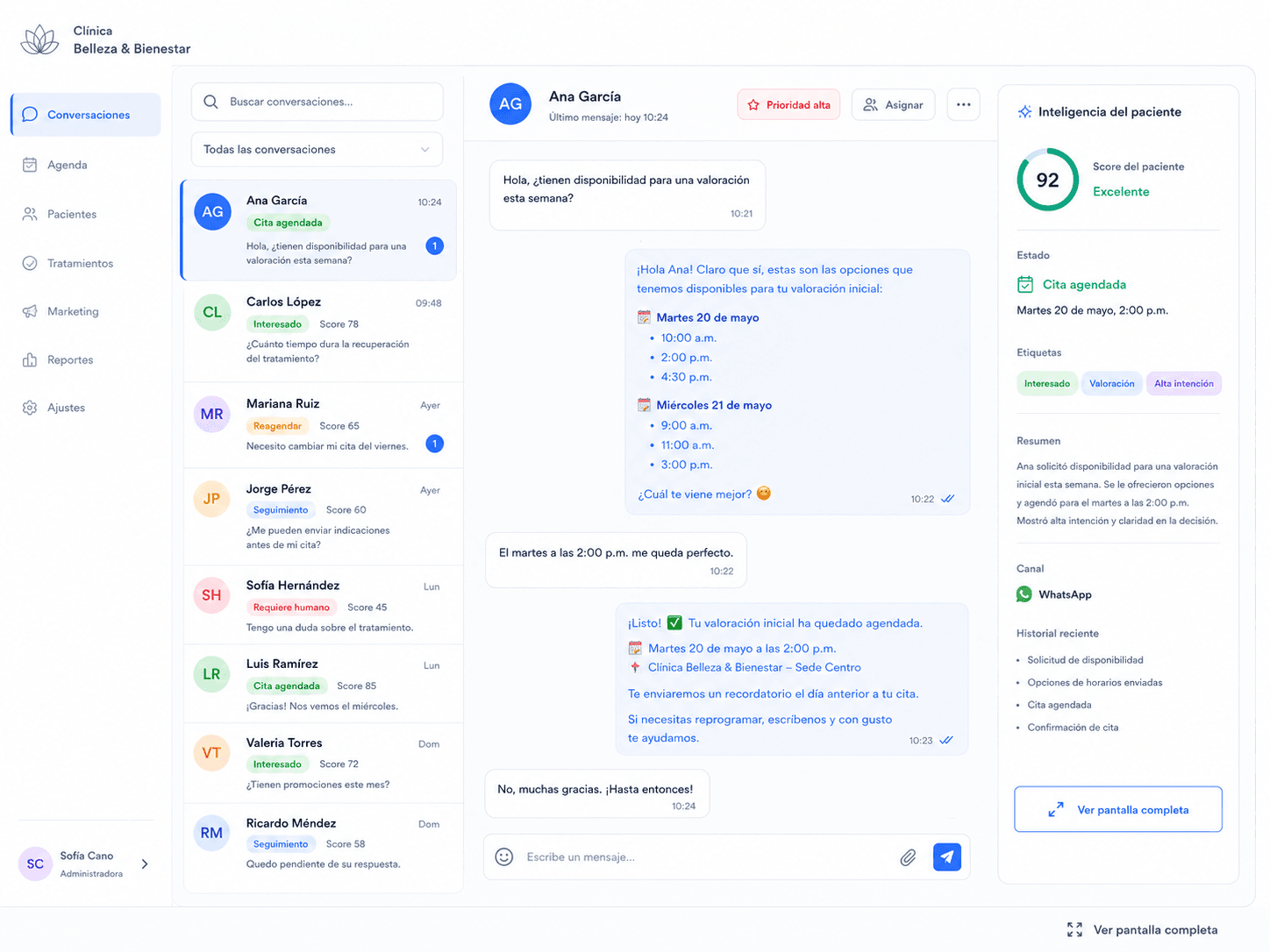
Conversations
Your front desk sees every chat, priorities, and patients who need follow-up.
Connect your clinic's operations
Kovia works alongside the tools your clinic already uses.
Calendars
Sync availability and appointments.
Google Calendar, Outlook, or per-doctor/practice calendars.
CRM / patients
Keep contact details, intent, and follow-up.
Your own CRM or patient system.
ERP / internal system
Integrate operational data when your clinic needs it.
ERP or internal system.
Centralize conversations and follow-up in a single flow.
WhatsApp Business.
Need a specific integration? Contact us
Choose your plan
Pick the plan that best fits your business needs
Starter
Interactions valid for 3 months
Get started and try Kovia with your real workflow—without a big upfront commitment.
- 1 Sales Agent
- 1,500 interactions included
- Lead capture and qualification
- Control Panel (CRM & Kanban)
- Voice and text responses
- Human handoff
- Calendar & automated scheduling
- 10,000 interactions included (Pro)
Standard
Interactions valid for 6 months
Great for fast responses and lead qualification.
- 1 Sales Agent
- 6,000 interactions included
- Lead capture and qualification
- Control Panel (CRM & Kanban)
- Voice and text responses
- Human handoff
- Calendar & automated scheduling
- 10,000 interactions included (Pro)
Need an Enterprise solution?
For high-volume operations, multiple teams, or custom integrations.
- More than 10,000 interactions per month
- CRM / ERP integration
- API & Webhooks
- Priority support
- Custom training
- Fiscal invoicing
WhatsApp (Meta) fees are paid directly to Meta.
For clinics with multiple doctors, branches, or practices, we can configure flows by service, calendar, or team.
Frequently Asked Questions
Common questions about how Kovia works in clinics.
Can the AI give diagnoses?
No. Kovia should be used for operational support: hours, services, prices, availability, appointments, and follow-up. If the patient asks for a diagnosis, medication, or sensitive clinical care, the conversation is transferred to a person.
Can it book with different doctors or practices?
Yes. We can configure availability by doctor, practice, service, or calendar, based on how your clinic operates.
Can it help reduce no-shows?
Yes. Kovia can send reminders before the appointment and timely follow-up to reduce patient no-shows.
Can it transfer to the front desk?
Yes. When Kovia detects that human intervention is needed, it can pause the AI and hand the context to your team.
Can I use my current WhatsApp?
It depends on your current WhatsApp Business and Meta setup. In the demo we review your case and tell you the best way to connect it.
Ready to serve your patients better on WhatsApp?
Book a demo and we'll show you how Kovia adapts to your clinic's operations.